Google Ads offline conversion was initially designed to track actions that accrue not on your website. It can be orders by phone, in-store orders, etc. Since the beginning, Google Ads offline conversions have been essential for companies with a significant percentage of offline sales.
With the recent tracking restrictions, like iOS 14/15, using offline conversions to measure Google Ads campaign results might be the only way to accurately track actions after users see or click your Google Ad.
Want to know how to set up Google Ads offline conversion tracking using server Google Tag Manager? Look no further! This blog post will show you how to use the sGTM container to send offline conversions to Google Ads. This will allow you to track and attribute sales to Adword campaigns.
Offline conversions are sales or leads that can be attributed to a Google Ads campaign, even though they occur offline (i.e., not on the website where the ad was clicked). For example, if you run a Google Ads campaign for your brick-and-mortar store and someone sees your ad, then comes into your store and makes a purchase, that would be an offline conversion.
Another example of an offline conversion would be if you run a Google Ads campaign for your law firm, and someone sees your ad, then calls your office to schedule a consultation. In this case, the lead would be attributed to your Google Ads campaign even though the actual conversion (scheduling the consultation) occurred offline.
Google has been relying more heavily on machine learning and modeling in recent years. For example, with the release of Google Analytics 4 last year, they introduced GA4 integration with Signals, which helps with cross-device user tracking based on data of people who logged in to their Google accounts. In GA4, you can also enable data modeling that will help track users who do not allow using cookies or opt-out of tracking.
Google’s data modeling relies on machine learning. When a user agrees to use cookies or allows apps to track them, Google is allowed to observe and report user actions on the site. They call it observed data. When Google cannot track people, it uses the information they learn from observed data to build Modeled data.
Since modeled data uses machine learning, there is a list of criteria that your GA4 property has to meet to be eligible for enabling modeling. The main reason is that machine learning is valid when it observed significant amounts of data. The principal criteria are:
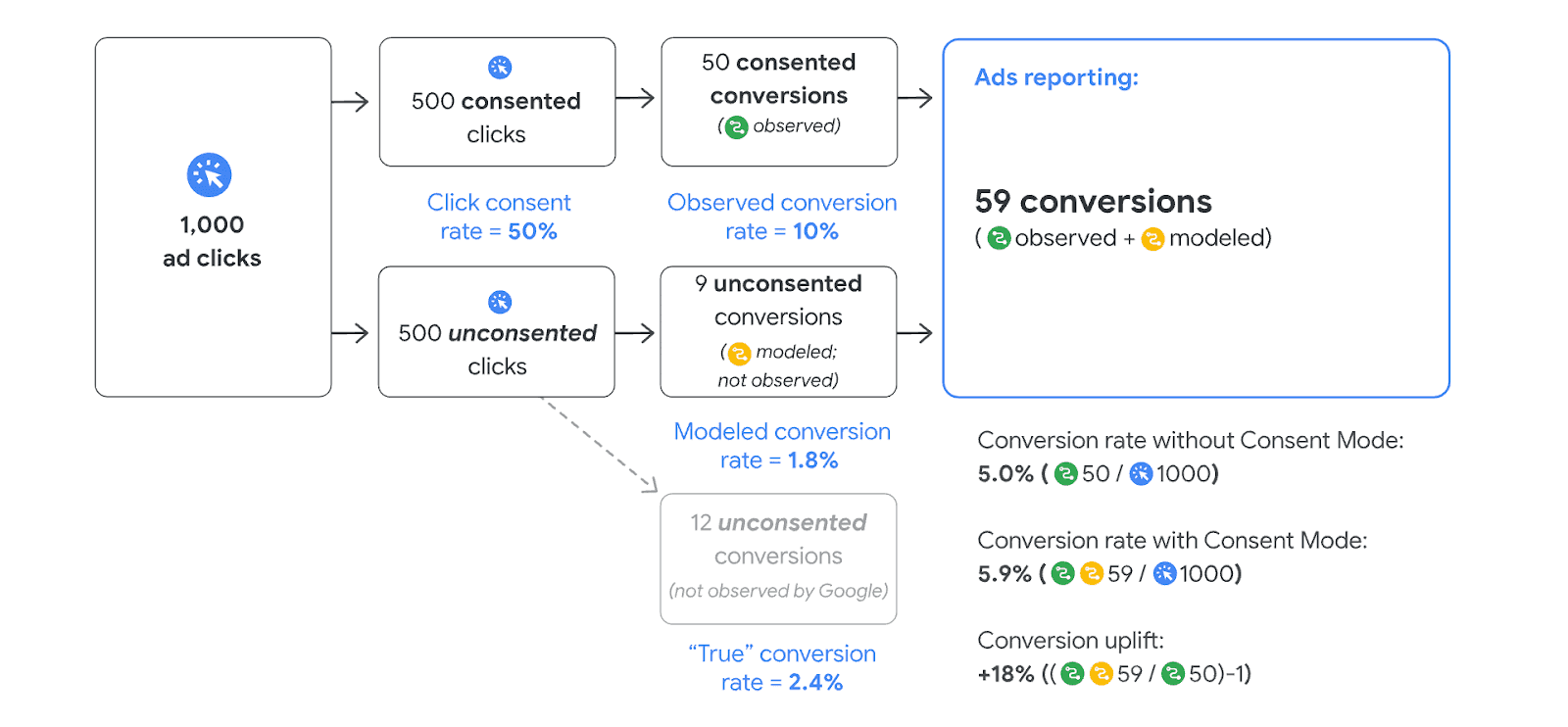
Since tracking restrictions have been rising during the last several years, some research shows that you can miss more than 30% of data in your analytics tool or advertising platforms.
Saying all that, Google Ads offline conversion might not only be the way to track users who converted offline but also an accurate way to track online conversion without relying on machine learning algorithms.
Google Ads offline conversion tag uses Firebase for authentication and Google Ads developer's account. We simplified the process of creating these two entities for stape users, which is why the list of needed things to set up Google Ads offline conversions depends on whether you are a stape user.
Skip this step if you have already connected your google service account to the stape sGTM container.
1.1 Login to stape account -> open the sGTM container that you want to set up the Google Ads Offline conversion tag for -> Click Power-Up -> Google Service account




Comments