
Custom loader helps make Google Tag Manager and Google Analytics 4 scripts more resistant to ad blockers and ITPs by modifying gtag.js and gtm.js loading path.
Using a custom loader and custom domain helps set 1st party cookies, prolong cookie lifetime and make the web Google Tag Manager and Google Analytics script resistant to ad blocking apps and algorithms.
Custom loader power-up is available on any plan. To enable it, all you need to do is log in to your stape.io account, open container power-ups and add a WEB GTM ID. Once done, you will see the modified Google Tag Manager and GA4 requests in console.
1. Log in to you stape.io account
2. Open sGTM container -> Click Power Up.
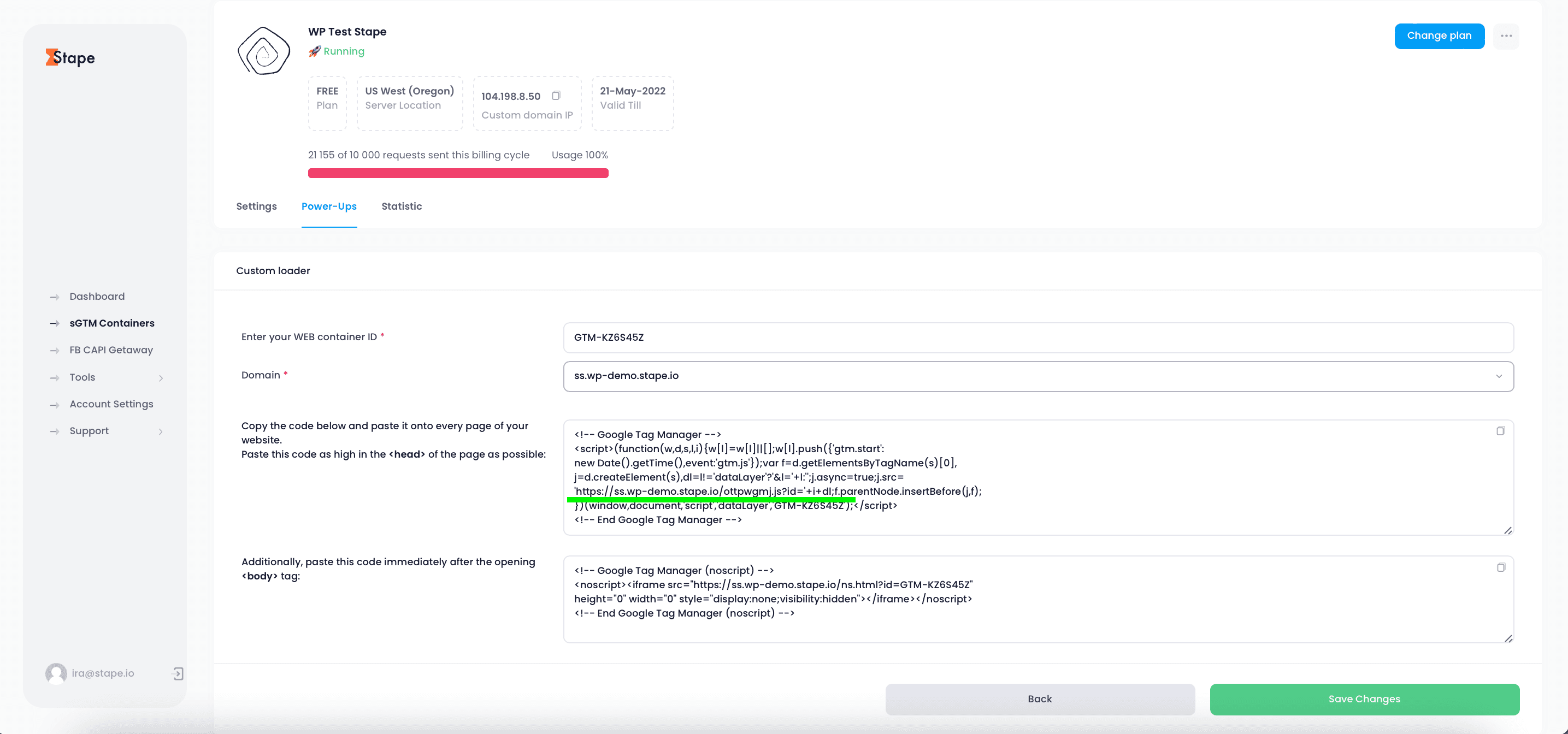
3. Click Config Custom loader power-up -> add your WEB GTM ID -> You will see updated web GTM code -> Copy this web GTM script and add or replace existing web GTM script on your site.
Find out how to use server-side tracking with Google Tag Manager and avoid being blocked by AdBlocker.
Hosting your server Google Tag Manager on stape is the best way to set up server-side tagging. Here's why...



