Setting up server-side tagging can be daunting. You have to invest time and money into setting up a cloud server, get familiar with the key concept of server-side tracking, and finally, set up ss tracking. We created stape hosting for the server Google Tag manager to make server-side tagging easier.
With Stape, you can set up tagging server URL in 1 click - it's super simple. Plus, it saves you money. Stape’s hosting is around five times cheaper than GCP.
With that being said, stape's sGTM hosting has multiple benefits, including its price point and simplicity, which allows anyone without technical knowledge to set up cloud hosting for the Google Tag Manager server.
But besides its cost and simpleness, stape has multiple other advantages. In this post, I want to cover all benefits that stape hosting for sGTM offers.
It’s highly recommended to use a custom subdomain for your tagging server URL. It will help to set cookies more accurately and prolong cookies.
Let me show a few examples.
- Increase cookie lifetime.
Safari has built-in Intelligent Tracking Prevention algorithms that cut cookies’ lifetime to 24 hours (most of the time). With the help of server-side tracking with a custom subdomain, you can prolong cookies in Safari. It means that when a user revisits your site, it won’t be considered as a new user.
- Set 1st party cookies.
When setting up Facebook conversion API using server GTM, you need to send fbp and fbc to Facebook servers. You can’t set these cookies when using a third-party subdomain as a tagging server since only your domain has access to declare cookies for your website. Without a custom subdomain, fewer parameters would be sent to Facebook, and hence lower number of events would be attributed to your campaigns. Click ID and browser ID (fbc and fbp) are fundamental parameters when measuring the results of your paid campaigns on Facebook.
Stapes custom loader does even more - it helps make Google Tag Manager and Google Analytics 4 scripts more resistant to blockers.
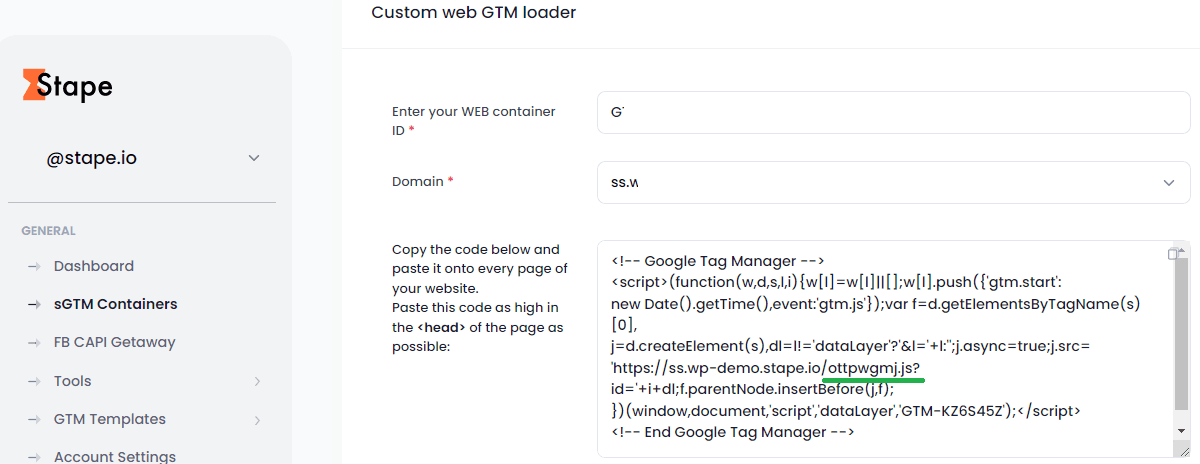
You can set up a custom gtm.js loader inside the stape.io admin. Just click settings and add your Web Google Tag Manager ID. After that, you need to update the GTM code on the site.
When you add web GTM ID to the stape.io custom loader, you can see that gtm.js and gtag.js were replaced by a random request path . This enhancement helps you “hide” the Google Tag Manager and Google Analytics 4 script from adblockers.
Preview header is a useful feature when you need to send requests to the server Google Tag Manager container from elsewhere (not web GTM). For example, from the CRM. Using the stape preview header feature, you can see requests from the CRM in the Google Tag Manager server container preview mode.
Let’s say you want to send a purchase event from the CRM to the server Google Tag Manager. One of the ways to do that is using webhooks. Data from the webhook will be delivered to your server Google Tag Manager but won’t be displayed in the preview mode, making debug and setup more complicated.




Comments