Ad Blocking is in no way a one-way street, and the impact of tracking script blocking extends far beyond just advertisements.
Many have been made about ad blocking apps and extensions these days, but what do they really do for users? One reason why people might consider installing adblokers on their device or browser is because of annoying ads and pop-ups that appear on the sites. But not only ads can be affected by AdBlockers.
In this post, I will discuss how adblockers can affect tracking scripts that are placed in Google Tag Manager. I will also show how to avoid GTM blocking by adblockers using server-side tracking.
This post is not encouraging anyone to track users without their permission. You should always respect user decisions and ask for their consent before firing any tracking scripts.
Some people might use GTM for non-tracking purposes (like implementing schema markup or adding a chat on the site). If GTM is blocked, it might negatively impact organic rankings or customer experience.
Adblocker is a software or browser extension that can alter or remove advertising content from websites. It can block advertising, tracking, and other content using different methods. One of the methods is by targeting the URL where this content originated.
By default, most ad blockers prevent only ads from being shown. It can be done either by knowing the URL of the advertising network (because of a specific database of URLs that is part of advertising networks) or using the names of tags in the code.
The default setup of the adblockers won’t hurt Google Analytics or Google Tag Manager. They will block only ads on the page that the user visits.
But users can adjust settings and ask adblockers to remove any tracking scripts. In this case, Google Tag Manager won’t work. It means that all scripts added inside the Tag Manager won’t work. If you add Google Analytics scripts outside of Google Tag Manager, it will be blocked as well.
In the past few years, more and more people have been using adblockers to escape advertisements. Since advanced settings of AdBlocker can affect GTM, your tags will be affected too. People might not even know that when they enable the advanced setting of ad blockers, they might block, for example, the ability to contact support via chat on the site.
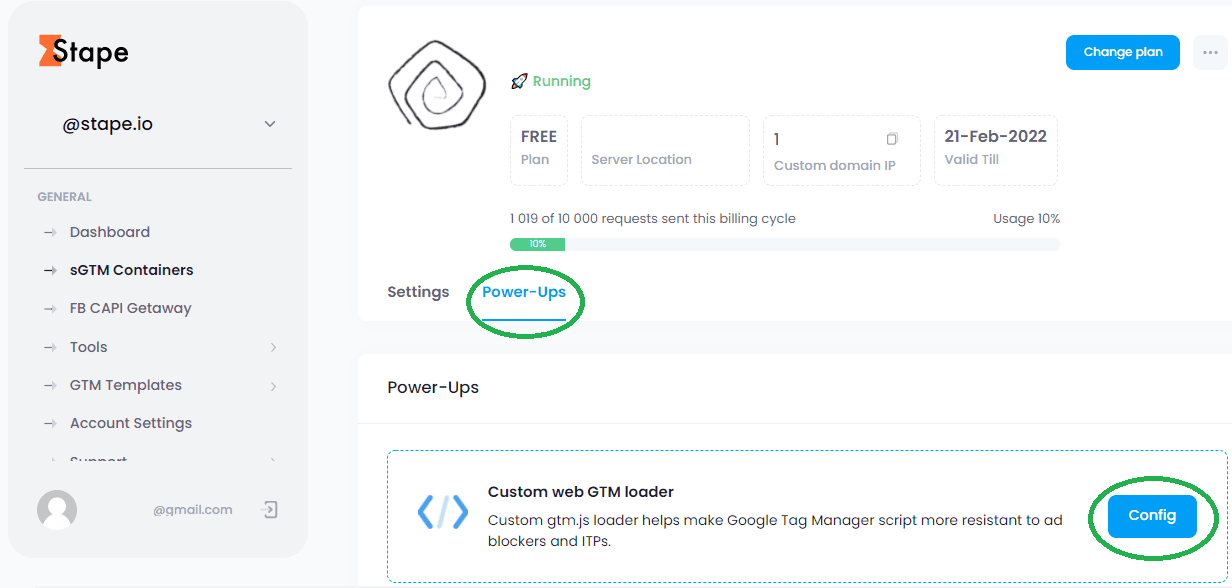
2. Log in to your stape.io account and choose a container-> Click Power-ups -> Click Config near the Custom web GTM loader.




Comments