
Ivanna Holubovska
AuthorOnline advertising is ever-changing, and new challenges come with it. Among these is server-side tracking, a method of tracking users’ activity on websites that rely on cloud servers instead of user browser. This blog post will explore what server-side tracking is, how it works, and some of its benefits and drawbacks compared to client-side tracking. So let’s get started!
Client-side tracking is the most popular way of connecting websites with tracking platforms. It utilizes the user’s browser (client) to send information to the tag managing system or analytics platform. One of the most popular tag management systems is Google Tag Manager. After your site is connected with Google Tag Manager, you can use it to send information to any platform, like Google Analytics, Facebook, TikTok, Mailchimp, etc.
To make client-side tracking work, you need to add Google Tag Manager (or any other tag management system) code to your website, ideally, create a data layer. After that, set up tags and triggers that send information about user activity to third-party tools.
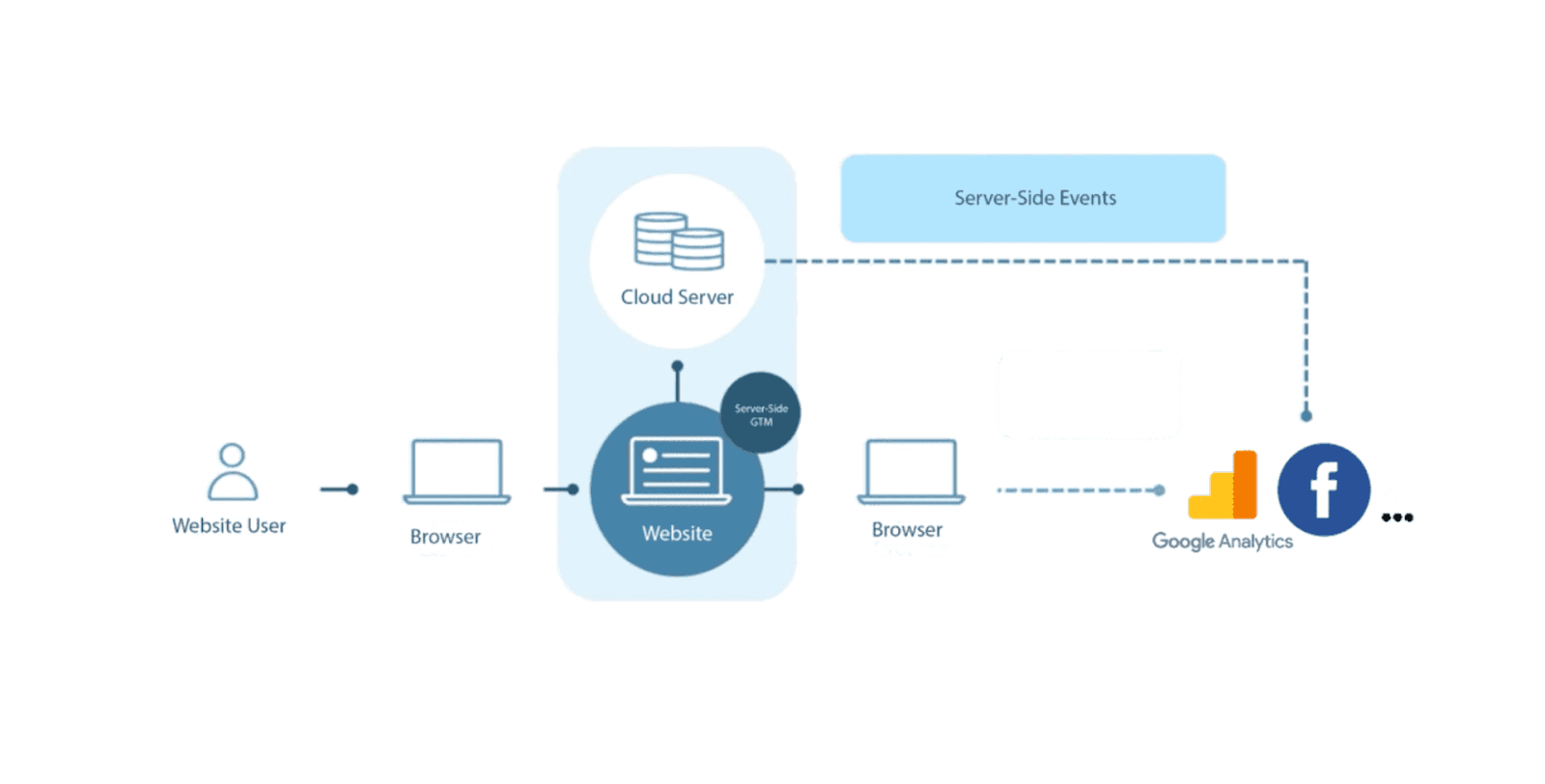
With server-side tracking, your website first sends data to the cloud server. Then the cloud server distributes data between third-party vendors and tracking platforms. The most popular ss tracking platform is again Google Tag Manager. They released their server-side container a couple of years ago.
A cloud server works as a proxy between the information you send to a third-party tool and your site (or any other data source). To use server Google Tag Manager, you need to set up a cloud server that should (but not must) utilize the subdomain of your website. Then, use server GTM requests to send information further to the tracking platforms.
Client-side tracking has been the most common way of tracking website users’ behavior, but it started to challenge for the past few years. The most extensive obstacle for the client-side tracking is decreased page speed performance, security issues, and 3rd party cookies. Let’s get into more details about each of these factors.
1. Decrease in page speed performance. Site speed is crucial for user experience. Every tracking script slows down your site, decreasing revenue from ads and organic positions. Some research shows that people will leave if the page takes too long to load - especially on mobile devices where the internet connection is slower. We compared site page speed with client-side tracking vs. server-side, and the results showed that moving tagging to ss can improve Google's performance score by around 40 points.
2. Security issues. With client-side tracking, you can’t control what data each vendor collects. 3rd party javascript can scrape PII or any other data from your site, and you won’t even know about it.
3. Cookies. Some browsers, like Safari and Firefox, have Intelligent Tracking Prevention (ITP) features designed to limit 3rd party cookies and tracking scripts. If you use client-side tracking, then cookie lifetime will be limited to 1 or 7 days.
1. Simplicity. Client-side tracking is more popular and older than server-side tracking. Because of that, more people are familiar with client-side tagging, meaning it will be easier to find a person who would implement client-side tracking on your site. It is also easier to find documentation and guides describing how to implement browser tracking.
2. Cost. Client-side tracking is free or cheaper than the server-side since you don't have to pay for the tagging server.
Server-side tracking is a more reliable, secure, and controllable way to collect and distribute data. This makes server-side great when dealing with sensitive information. It had numerous advantages over the client-side. We have a blog post that describes all server-side tracking benefits. For more detailed information, please click this link. I will focus on the most important ones here.




Comments