Having reliable data in the server Google Tag Manager is a key to accurate server-side tagging. One of the most popular ways to send data from web to server GTM is Google Analytics 4. GA4 has its limitations. That is why we created Data Tag and Data Client that should work together to deliver event and user data from web to server GTM.
In this article, I want to show you how to use Data Tag. This custom tag sends parameters from the Google Tag Manager Web Container to the Server Container. When used together with the Data Client for the Google Tag Manager server container, it allows sending data layer variables, custom parameters, and other data from the web to the server container. As a result, Data Client retrieves information from the Data Tag into the Google Tag Manager Server Events.
Companies started to take advantage of the Google Tag Manager server-side containers in the last couple of years. Some of them are implementing the combination of web and server containers. Others want to move their tracking from the client-side and start utilizing only server-side tracking. The Data Tag that we created is designed to deliver data from the web to the server container. The clients who wish to combine web and server tracking will find it especially helpful.
The server-side tracking allows moving the instrumentation of Google Tag Manager to the server environment. In other words, you can move your tracking out of the browser and into the server. Our Data Tag and Data Client solve the problem of transporting data from the Google Tag Manager web to the server container. Let’s say that you have all the data you need configured on the web container, but the server environment cannot use the same data Layer variables, DOM elements, etc. Our Data Tag and Data Client solve the problem of transporting all the data from the web to server container with no extra efforts required.
With the help of the Data Tag, you can configure what events, event parameters, and user data you want to send to the server container and when. On the other side, our Data Client should be placed inside the server container to listen to the Data Tag information and process it into the events data.
All the information will be stored on your server. Data Tag and Data Client will allow storing, molding, and retrieving the data from the web container and utilize it to set up server-side tags. Data Tag and Data Client inside the server container will shape and guide the data to the proper destinations using tags.
I will start by describing all fields and options this tag has. It will help you understand better which information you can send from the web to the server.
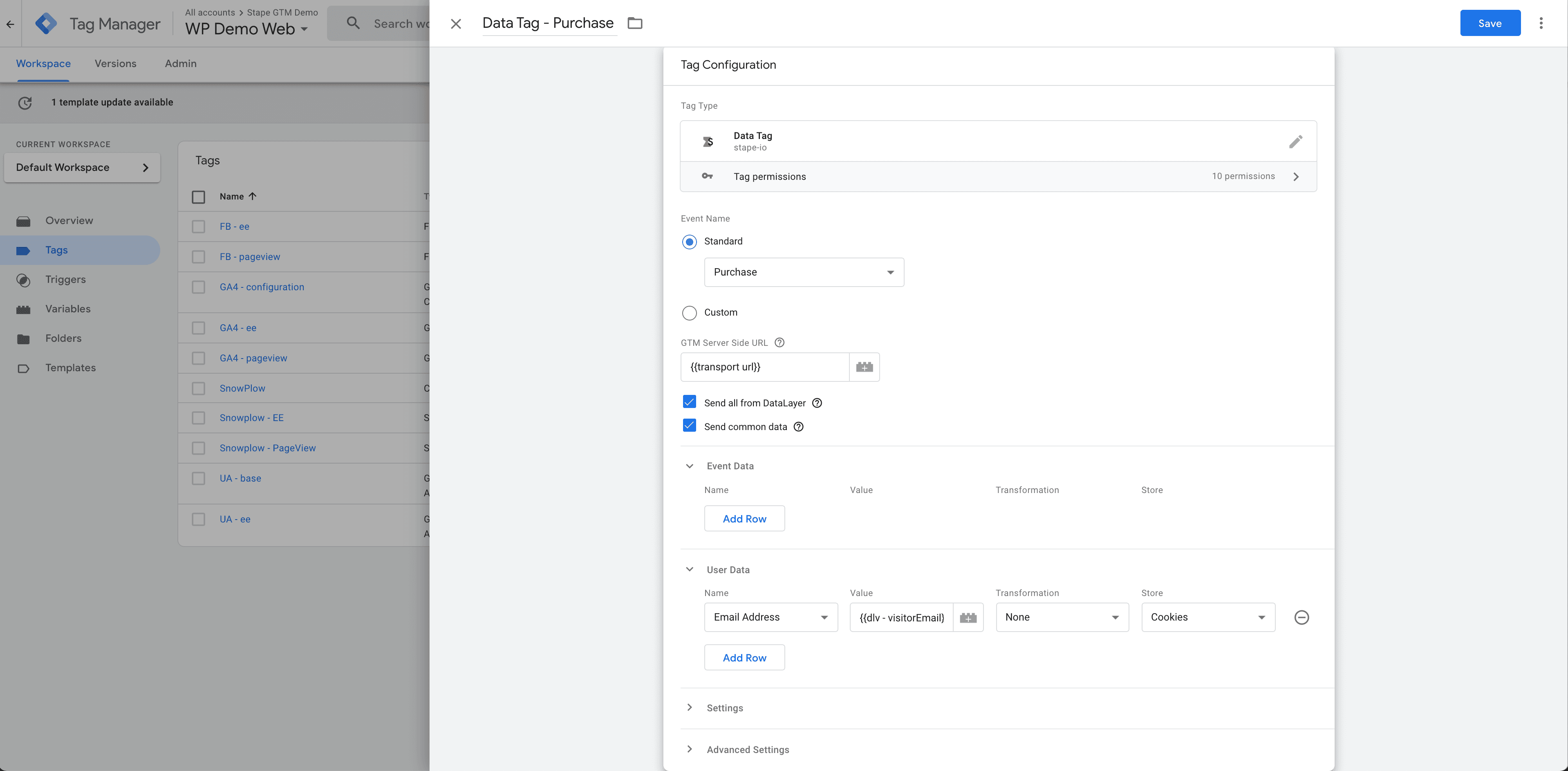
Event Name. You have two options: select a standard event from the dropdown menu or send a custom event. Using the custom event, you can add variable {{event}}, and in this case, the Data Tag will send all events you see inside the preview mode.
GTM Server Side domain is a required field. You can find it in your Google Tag Manager Server container settings under Tagging server URL. Data Tag will use this domain to send requests.
You can choose to send all data layer values to the server container by enabling Send all from Data Layer.
If you enable Send common data, Data Tag will send page_location, page_path, page_hostname, page_referrer, page_title, page_encoding, screen_resolution, viewport_size.
Inside the event data tab, you can add the custom event parameter you want to send to the server container. You may choose any web tag manager variable or type static value or text inside the Name and Value fields. There is also an option to modify values with functions Trim, To lower case or Hash. You can also store variables.
With the help of User Data, you can send user parameters. You need to select the parameter name from the dropdown menu, add a static value, or use the variable. There is also an option to transform value with trim, to lowercase, hash functions and store. You can use these fields to send user data to the server Facebook tag to increase event matching for your Facebook CAPI. If you are using our Data Tag, Data Client, and Facebook CAPI, then the Facebook tag will automatically take user data from Data Tag.
Inside the Settings section, you can change request type (by default, request type is POST, change it to GET), path and protocol versions.
Advanced Settings are standard settings you have inside all Google Tag Manager Web tags.




Comments