Google Analytics 4 and Google Tag Manager Server-Side container are the biggest updates in the analytics world in 2020. Google rolls out updates to both of them every week, but it shouldn’t stop you from testing it on your website. However, I do not recommend switching to only GA4 and GTM server tagging and disabling web container with Universal Analytics. In fact, you won’t be able to move all tags from the web container to the server container since the GTM server container doesn’t yet have predefined clients and tags for the most popular platforms. And the template library is not available for the Server GTM clients. Even so, there is a way to move all your tags to the server container if you have a team of developers and analytics experts who can write tags and clients for you.
In this article, I will describe the advantages of using GA4 and GTM server tagging. You can use it as a step-by-step guide on how to send events to GA4 via the GTM server container. As for eCommerce/enhanced eCommerce, I will cover it in another article.
The first question you might ask is why Google Analytics 4? Were there versions from 1 to 3? And is it the 4th version of Google Analytics? The answer is yes. It is the 4th version of Google Analytics. Everything started with Urching in 2005, then transitioned to Google Analytics (ga.js) in 2009 and Universal Analytics (analytics.js) in 2013. And now we have GA4.
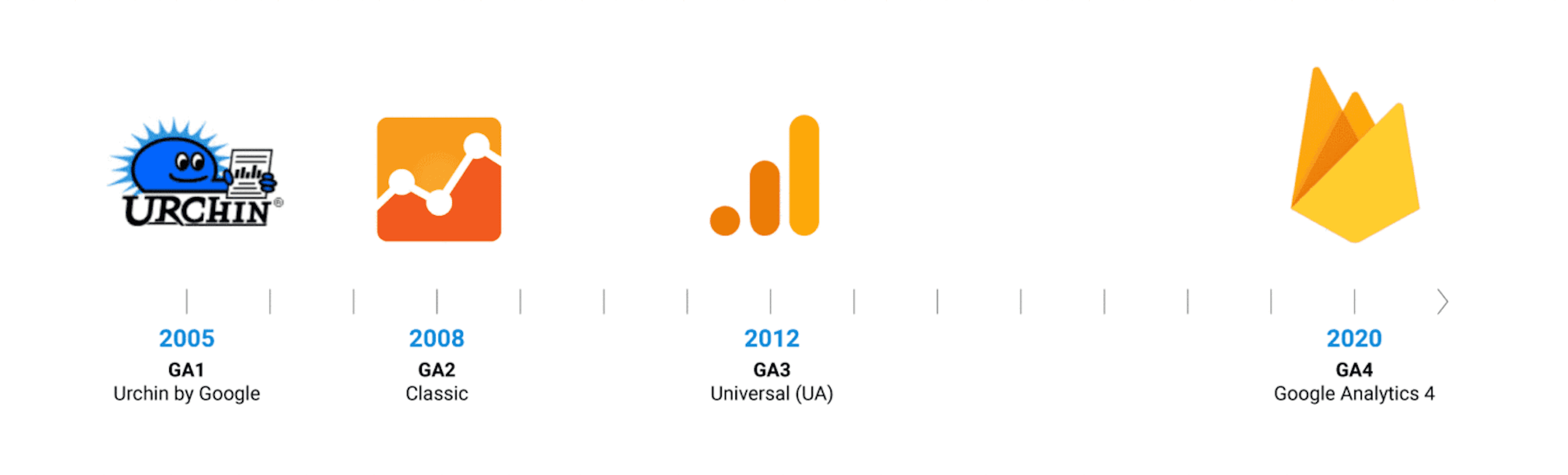
GA4 was available for everyone since July 2019, but it had a different name — APP + WEB. Then, Google decided to rename it and make a big press release. That is how it got a new name — GA4.
If you want to register a new Google Analytics account, GA4 would be the default option. Google will ask you if you wish to create Universal Analytics property as well. But bear in mind that the GA4 interface is a far cry from the well-known Universal Analytics.
It looks like Google is telling users that it’s time to get used to GA4 and move their tracking from UA to GA4. After all, numerous changes were made to data collection and reporting.
1. Event-driven data model.
The most significant change that was introduced is switching from the page view/sessions concept to the event-driven data model. This data model has been used for mobile apps analytics for several years now. The pageview model, however, does not fit mobile apps and SPA. It has to do with users having a completely different behavior when using apps and websites.
The event-driven data model allows you to create an event for any website activity you would like to record inside GA4. Besides, you can use parameters that add more value and description to each event. Google prepared the list of recommended event names to use inside GA4, but you can also create custom events and custom parameters.
2. Cross-device reporting
When it comes to traffic and sales analysis, cross-device user/conversion tracking is the main point. Let’s say a user saw your Adwords ad on the mobile and clicked on it. But for some reason decided to proceed with the checkout on the desktop. The user, however, did not log into any of the Google services. So, Google cannot recognize him and give credit to that particular Adwords click. As a result, the conversion source is lost, and the information for Adwords optimization is incomplete.
To solve this problem, Google released Signals a few years ago. Google integrated Signals functionality into GA4 and added machine learning. It is designed to identify users who are not logged into any of the Google services. If a user is not logged into the Google services or his device cannot be identified via fingerprinting, machine learning fills all the gaps.
By the way, Google signals data collection is not enabled by default inside GA4. You need to enable it manually by going into settings -> clicking data settings -> data collection.
Another essential setting (and a new one) that you should consider checking is how GA4 identifies users.
They have two options:




Comments