
Anonymizer power-up is available for all Stape Europe users. Its main goal is removing or anonymizing user data from Google Analytics 4 & Universal Analytics.
To enable Anonymizer, log in to your EU stape.io account, open the sGTM container and click Power-Ups. When you open the configuration setting of Anonymizer, there will be a list of Google Analytics and Universal Analytics parameters that Anonymizer can remove or anonymize. Select if you want to leave the parameter as is, remove or anonymize it.
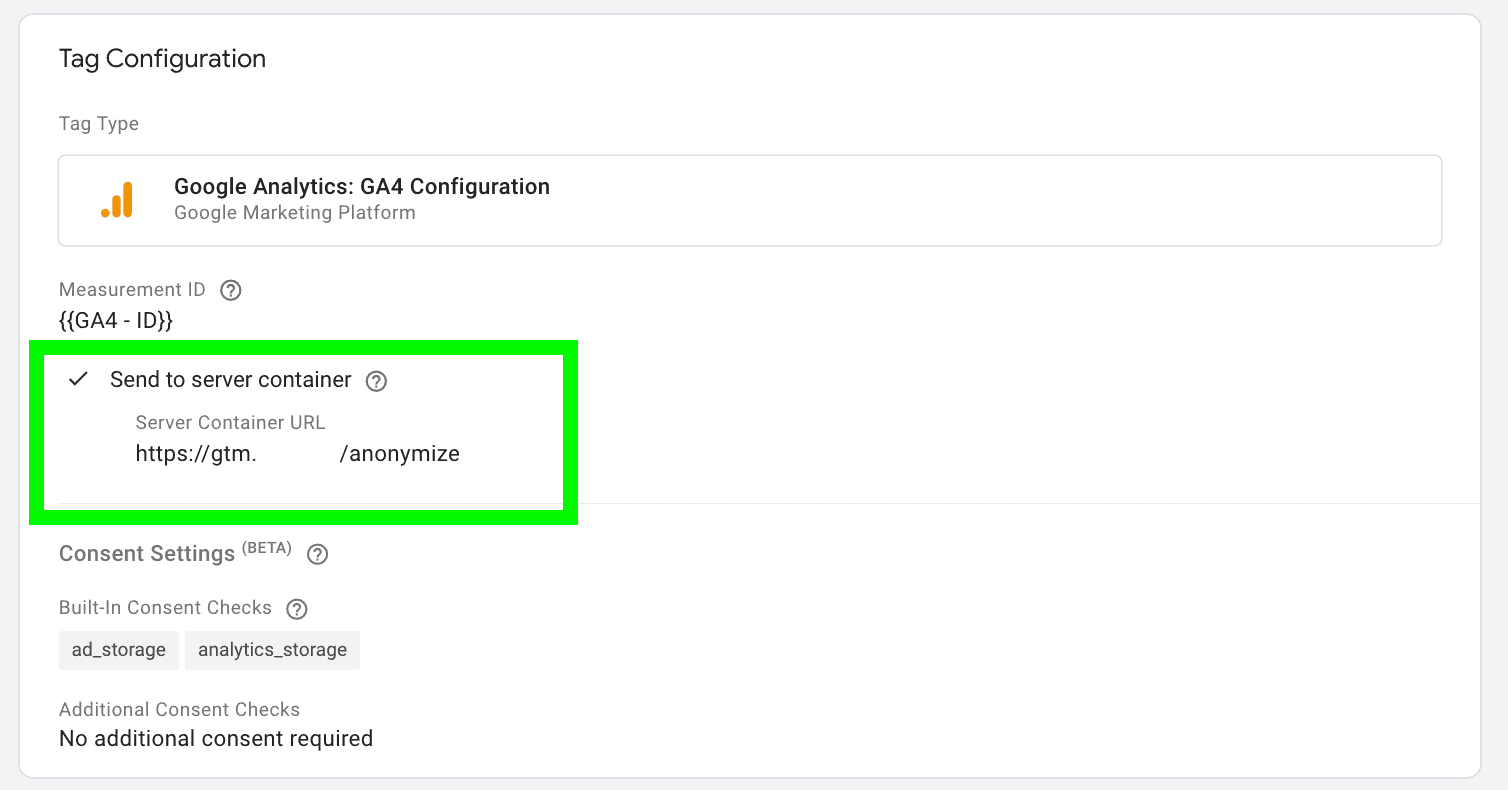
After Anonymizer is configured, you should update tagging server URL for your Google Analytics to the one that ends with /anonymize. For example, if the default tagging server URL is sgtm.site.com, then URL with Anonimiser will look like sgtm.site.com/anonymize
When GA requests go through the tagging server URL that includes /anonymize, we automatically remove or anonymize selected parameters.
You will have two options for most parameters: leave as is or remove. For two parameters (IP and Client ID), you will see options to Anonymize and Anonymize Strictly.
IP
Anonymize - removes the last octet.
Anonymize Strictly - removes the last two octets
Client ID. Work only if you use JavaScript Managed client identification.
Anonymize - use a hash of IP+UserAgent and add year+month.
Anonymize Strictly - use a hash of IP+UserAgent and add a timestamp, crc32_hash(IP+UA).timestamp
| Parameter name | Description | GA4 Parameter | Anonymize |
| IP | User IP | IP Address | Anonymize - removes the last octet. Anonymize Strictly - removes the last two octets |
| Client ID | Google Analytics Client ID, _ga, _ga_*, FPLC, FPID cookies | cid, _ga, _ga_*, FPLC, FPID | Anonymize - use a hash of IP+UserAgent and add year+month. Anonymize Strictly - use a hash of IP+UserAgent and add a timestamp, crc32_hash(IP+UA).timestamp |
| User ID | User ID, Google Developer ID, Firebase ID | uid, gdid, _fid | - |
| Session ID | Session ID, New Session ID | sid, _nsi | - |
| Query parameters | Remove query paramaters from Document Location | dl | - |
| Referer | Document Referrer Header, Document Referrer Parameter | referer header, dr | - |
| User Agent | Document User-Agent header, Sec-Ch-Ua header, Sec-Sh-Ua-Platform header, Sec-Ch-Ua-Mobile header, User-Agent Parameter | user-agent header, sec-ch-ua header, sec-ch-ua-platform header, sec-ch-ua-mobile header, ua | - |
| User Country | Geographical ID, Current country for the user | geoid, _uc | - |
| Browser plugins | Java Enabled, Flash Version | je, fl | - |
| Screen Info | Browser screen resolution, Viewport size | sr, vp | - |
| Screen Colors | Specifies the screen color depth | sd | - |
| User Language | Browser active locale | ul | - |
| User Agent Architecture | uaa | - | |
| User Agent Bitness | uab | - | |
| User Agent Full Version List | uafvl | - | |
| User Agent Mobile | uamb | - | |
| User Agent Model | uam | - | |
| User Agent Platform | uap | - | |
| User Agent Platform Version | uapv | - | |
| User Agent WOW64 | uaw | - |
| Campaign Medium | cm | - | |
| Campaign Source | cs | - | |
| Campaign Name | cn | - | |
| Campaign Content | cc | - | |
| Campaign ID | ci | - | |
| Campaign Term | ck | - | |
| Campaign Creative Format | ccf | - | |
| Campaign Marketing Tactic | cmt | - | |
| Google Ads ID | gclid | - | |
| Google Display Ads ID | dclid | - |
How you can use server-side tracking to comply with GDPR. Plus, some tips on using consent mode in the server Google Tag Manager and protecting users' data.
In this article, I will cover removing personal identifiers from GA4 using stape power-up and manual implementation. This is an extension of our previous blog post, which covered how to use GA in a GDPR-compliant way.



