When setting up server-side tagging, the most common scenario for setting up a data flow is sending data from web GTM (or other endpoints like CRM, CMS, Google Sheet, etc.) to server GTM containers. But what if you need to trigger a tag in web GTM based on data from sGTM. How can you send dataLayer pushes from server GTM to web GTM?
This blog post will show how to send data from server to web GTM using stape’s Data Client and Data Tag. Let’s get started!
Surprisingly we’ve faced many use cases to trigger web events based on data in server GTM. And these use cases deal with different aspects of tracking - triggering events, creating variables, enriching data, setting cookies, etc. Let's take a look at some examples here.
There are several methods of enriching data using server GTM. We already have blog posts on how to enrich sGTM data using CRM, Firestore, and Google Sheets. With the help of dataLayer pushed from sGTM to web GTM, you can enrich web GTM tags as well.
Let’s use Facebook as an example. According to FB documentation, when FB sees identical web and server events, they discard server events and track only web events. Together with the server event itself, they dump all user and product data. So if server event sends more data, Facebook won’t use it. You can solve this issue by sending additional parameters from server to web GTM container and adding it to FB pixel tags.
We had a situation when we needed to trigger web events only after a server event was set. For example, trigger a purchase event only after sending the server pageview. Or you need to use a server variable in the web GTM container. It means that web tag should be triggered only after sGTM sets this variable. It applies, for instance, when generating Facebook event ID in sGTM and using it in the web GTM.
Server cookies can be more powerful and long-lived compared to web cookies. That is why you might decide to set server cookies. To make server cookies work correctly, you should trigger web events after server cookies are set. Otherwise, web tags might reset server cookies. The process of setting server cookies can be complicated and has some nuances. We will create another blog post about setting up server cookies.
Feature of sending server GTM events to web GTM datalayer is available in Data Tag and Data Client. These two were designed to send data from the web to server GTM. With this new feature, we can do the opposite - send data from server to web GTM. Let me show you how this works.
To make this process work, you need to set up a Data Tag in the web GTM and Data Client in sGTM. Open Data Tag, scroll to the settings section and enable Push event to DataLayer after the tag receives a response. You will need to set two parameters.
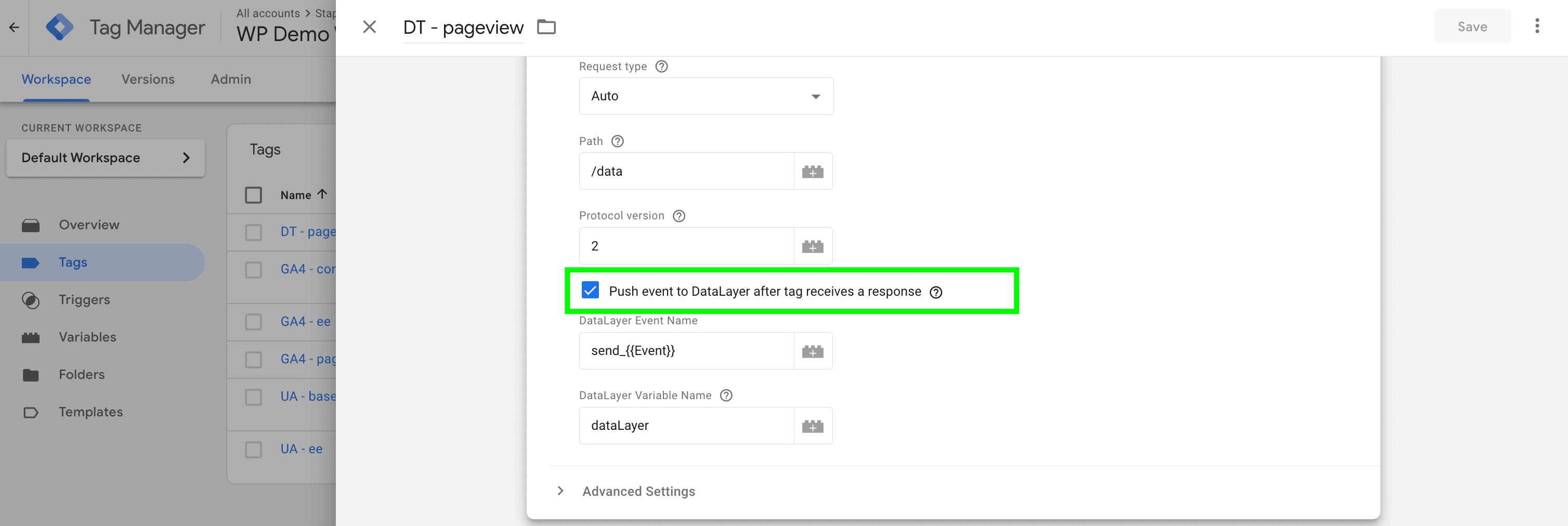
DataLayer Event Name - set dataLayer event that should be sent to the web GTM once server Data Tag receives a response from the server. It may be a static value or variable.
DataLayer Object Name - Use dataLayer by default. Modify only if you renamed the dataLayer object name.
Once done with the setup, Data Tag will receive a response whenever a tag in sGTM triggers based on a Data Client request. Once a response is received, it will send a datalayer event push to the web GTM.




Comments