The first step to successfully web tracking is creating a detailed plan that describes what events and event data should be sent and when. This ensures the correct information gets collected, analyzed, and reported back to analytics tools like Google Analytics or Facebook.
Configuring server-side tracking should start even with an earlier phase - planning how to set tagging server.
Configuring a tagging server is relatively easy if you plan to use an sGTM container for one website. Just create a custom domain for the tagging server, set necessary DNS records, configure sGTM, and that’s it. But what should you do when using one server GTM container for multiple websites? When does it make sense to use one sGTM container for several websites? How should you map custom domains in this case?
In this blog post, I will try to cover all questions related to server-side tagging for multi-domains and show how to set up a multi-domain tagging server using stape.
These are the three most popular use cases for utilizing one sGTM for several websites from my experience:
You might decide to use one server Google Tag Manager for multiple websites to reduce expenses on sGTM hosting. Though it really might decrease costs on running sGTM, we highly recommend using one sGTM on multiple domains when it is strictly necessary because a multi-domain setup makes managing sGTM tracking extremely complicated.
Using one server GTM container for several websites can lead to an increase in the number of tags and triggers because you might have situations where it's necessary to create a separate tag or trigger, depending on the domain.
Besides server-side GA, you will want to set up ss tracking for other platforms like Facebook, TikTok, Snapchat, or maybe use Firestore or Google Sheet integration. With multiple websites in one sGTM, the number of sGTM elements will grow exponentially since you must create tags, triggers, and variables for each website.
Eventually, you might reach the limits of the server-side GTM container. Yes, you can’t create an unlimited number of elements in an sGTM container. Google determines how heavy the sGTM container is by evaluating the size of the code and not the number of elements in sGTM.
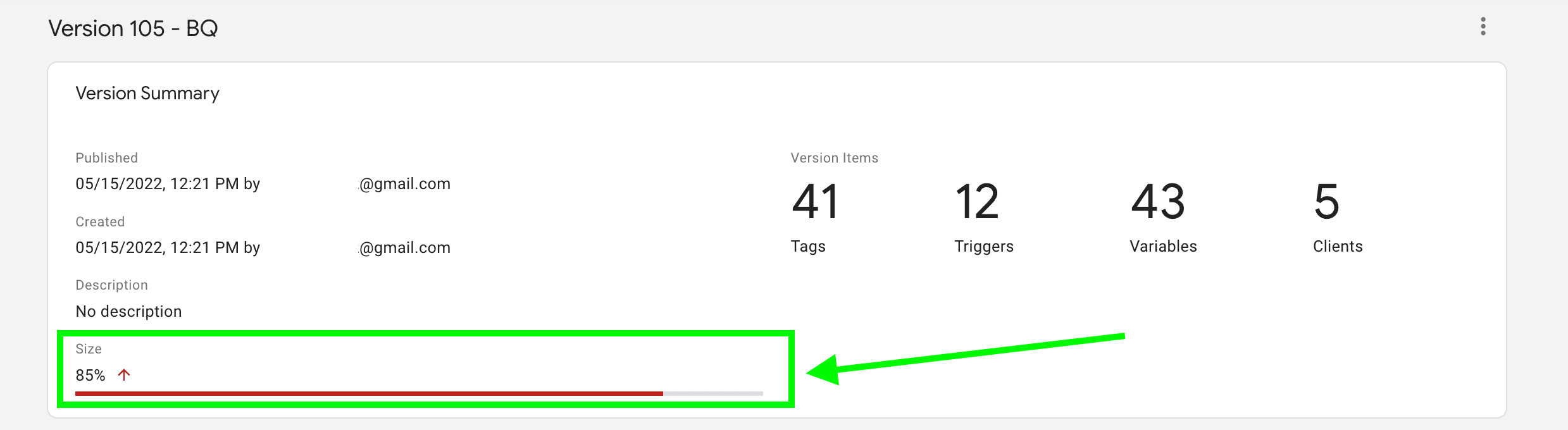
One of our test containers reached the limit of 85% with only 41 tags and 5 clients. When the container comes to the limit, you should either restructure the sGTM container into several sGTMs, which means using another tagging server URL. Or delete some parts of server GTM.
The key feature of server-side tagging is setting first-party cookies. To do so, it’s necessary to configure a custom domain for a tagging server URL. Custom domain should be located within your main site domain hierarchy. When using sGTM for one site, it’s easy to determine a custom domain, just use top-level domain +1.
Here I want to cover two scenarios for using one sGTM for multiple domains.
When mapping websites with completely different domains into one sGTM endpoint, it's necessary to create a custom domain for each site individually. Later in this article, I will show you how to configure tagging server, server and web GTMs for multi-domain containers with different domains.
When websites share the same domain (example.com and blog.example.com), tagging server domain should be configured on the top-level domain + 1 (eTLD+1) of the given domain or URL.




Comments