
Ivanna Holubovska
AuthorOne of the few platforms that made server-side tracking required for all advertisers is Refersion, a market leader in affiliate marketing worldwide. They guarantee affiliates that all of their marketing efforts are properly acknowledged and compensated with the aid of S2S integration.
We developed the tag for the server Google Tag Manager to make the Refersion s2s integration process simpler. I'll go through the benefits of server-to-server communication in this blog article, along with how to set up Refersion server-to-server tracking using server GTM.
Refersion is dedicated to giving advertisers and affiliates the greatest possible conversion tracking experience. As a pioneer in the field, they always work to collect precise data so that all parties may confidently assess the performance of their efforts. Refersion is constantly concerned with using the finest and most dependable conversion monitoring systems, since this is essential for success in affiliate marketing.
Due to ITPs, adBlockers, and the limited usage of third-party cookies, conversion tracking becomes difficult. Refersion created server-to-server integration and made it a requirement for all advertisers on their platform in order to help deal with all these tracking limitations that are present in browser tracking.
With the help of our tag you can easily implement Refersion tracking in server Google Tag Manager. By doing that you will receive lots of advantages, such as increased pagespeed, better protection and control of the data, a better understanding of results from affiliate marketing, etc.
2. Send data to the server GTM container. The two most popular ways of sending data to sGTM are Google Analytic 4 and Data Tag/Data Client.
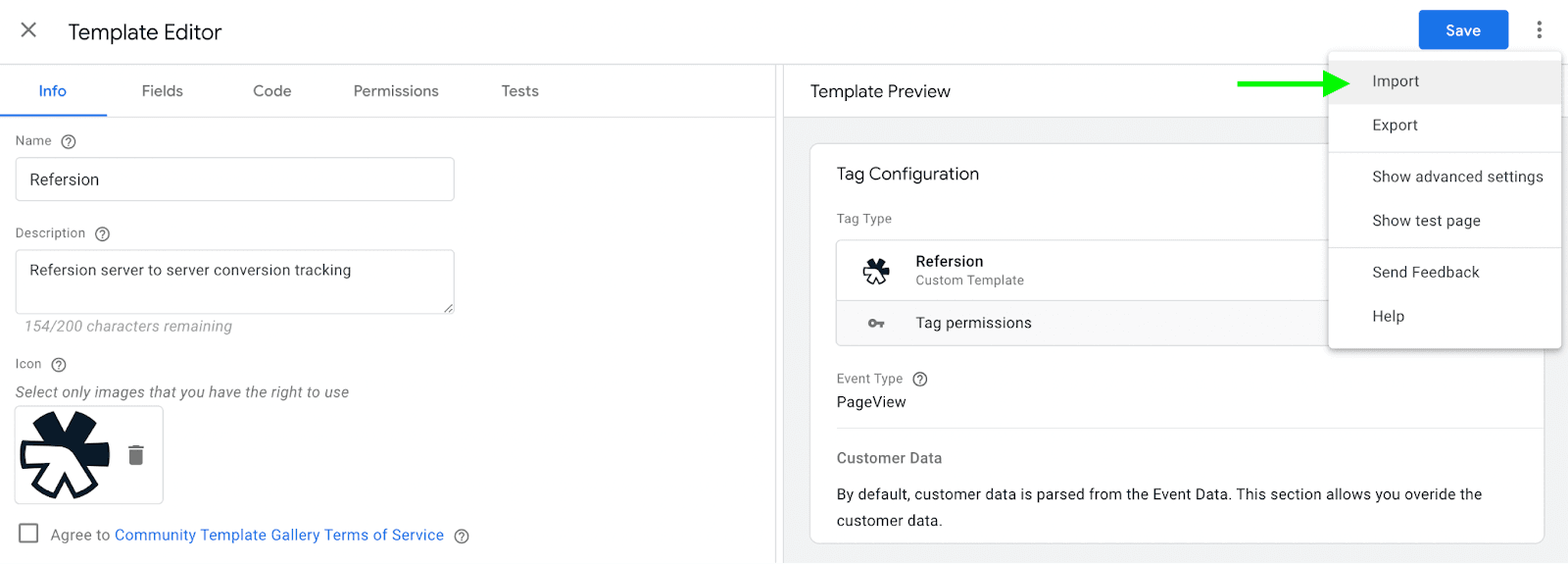
3. Add Refersion tag from the Template Gallery or download Refersion tag from GitHub -> Open templates sections in the server Google Tag Manager container -> Click New.
4. Click three dots in the top right corner -> Click Import -> Select Refersion tag template you’ve recently downloaded from GitHub -> Click save.




Comments