Search
Contact salesTry for free

How to easily maintain Facebook Test ID in your Google Tag Manager Server container

Ivanna Holubovska

Ivanna Holubovska

Author
Updated
Feb 5, 2022

We've all faced the inconvenience of managing Facebook Test ID: you do need it for debugging and testing your setup, but it's ought to be removed from the tags once you deploy your container. So how do we address this? The answer is - lookup table.

Step 1 - go to the Variables menu in your Google Tag Manager Container and make sure 'Debug Mode' is enabled in Built-in Variables. If it's not - press 'Configure' and click the checkbox right next to 'Debug Mode'. Now your GTM can reference this variable.
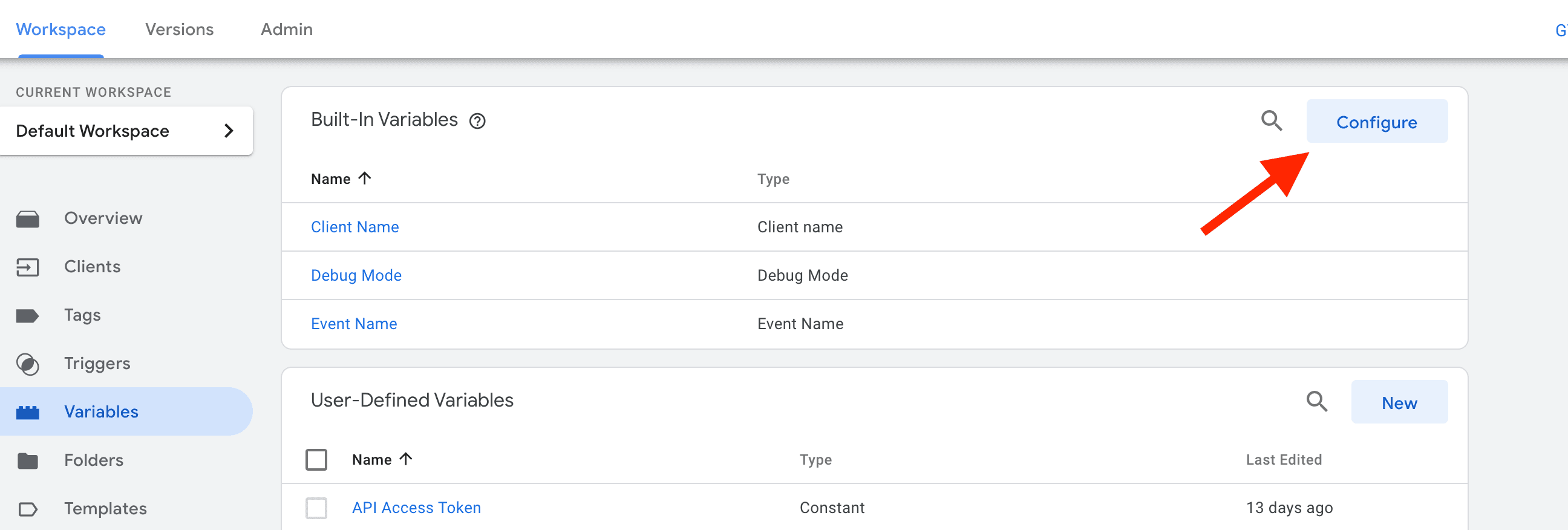

create facebook test ID variable in the server GTM
author

Ivanna Holubovska

Author

Content contributor at Stape.io, focusing on server-side tracking, digital marketing, and innovative solutions to optimize online business performance. optimize online business performance.

Comments

Try Stape for all things server-side

What’s going on?

Where are we going?

Attention!
This is a stand-up dog zone.
