Using Facebook conversion API, you can send events from your server to the Facebook server. Server-side tracking with configured custom subdomain helps to bypass ad blockers, ITPs, and iOS 14/15 restrictions.
Together with Facebook Conversion API events, you should send additional parameters.
These parameters can be divided into three parts:
The latter helps Facebook Conversion API match events you send from the server to real users. It can be any information like email or last name. These parameters were created to help Facebook identify users.
For every server event you send, FB will show you an event match quality score. This match quality score depends on the number of customer information parameters you send and their accuracy.
Facebook CAPI event match quality can significantly impact your campaign’s results and audience accuracy. Let me walk you through some tips on how to increase the Facebook match quality score in this blog post.
The key to proper FB conversion API setup is the event match quality score. Why? Well, Facebook utilizes user data sent from your server to match event instances like adding a product to a cart to a specific FB account. In other words, events match quality grades the customer information you share. The number of the parameters sent affects the percentage of sent events.
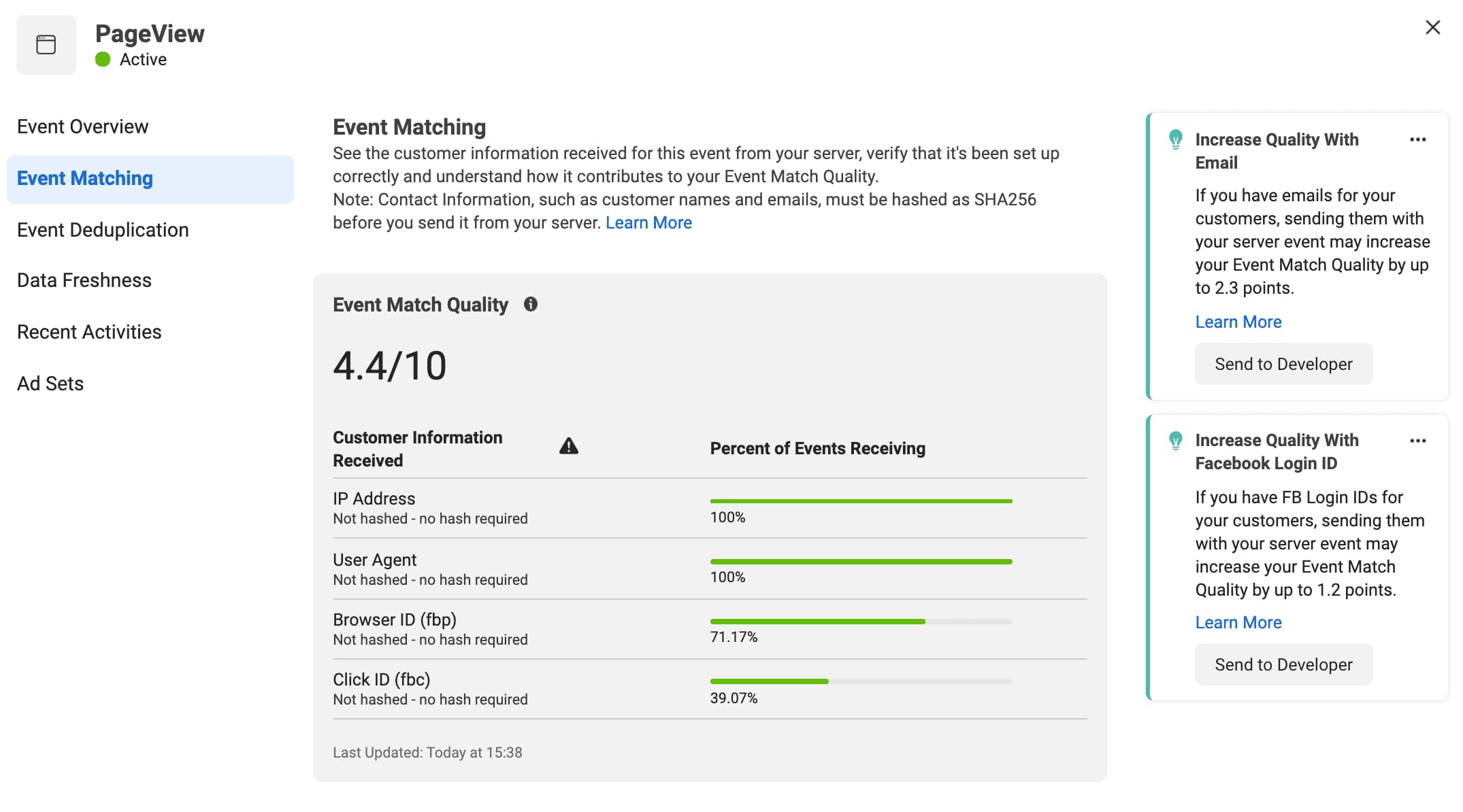
User data can be divided into the following subcategories:
1) Parameters that require hash and can be sent as is.
Such parameters as zip code, email, or state need to be hashed (basically, all parameters that contain personal user information). But parameters like client user agent, IP address, or browser ID do not require a hash.
2) _fbp
Facebook pixel automatically ads _fbp cookie when it is using first-party cookies. This unique identifier consists of version (always FB), subdomain index (for example, 0 for stape.com, 1 for app.stape.com, etc.), creationTime in the UNIX time standard, and it represents time in milliseconds when _fbp cookie was saved and a random number.
Here is the example: fb.1.1596403881668.1116446470
When the Facebook pixel is installed on a website and uses first-party cookies, the pixel automatically saves a unique identifier to an _fbp cookie for the website domain if one does not already exist.
3) _fbc
When a user clicks on the FB ad, it includes the fbclid query parameter. If they land on the site that uses a first-party cookie with enabled browser tracking, then the fbclid query parameter is saved inside the _fbc parameter.
It’s important to understand that not all your events will have _fbc parameters. Traffic from organic searches, google ads, or email campaigns won’t contain _fbc since interactions with the site don't happen on Facebook.
The maximum score you can get for the FB server event is 10. Getting to the ultimate point will be complicated. This score means that you have to send all user information parameters for your server events, and these parameters are sent on all occasions.
For events such as PageView, where you do not have any user parameters, the match score will be around 4. Everything that you will be able to send is _fbp, _fbc, IP Address, and User-Agent.




Comments