
Ivanna Holubovska
AuthorUsing Facebook Conversions API, you can send events to Facebook Event Manager. That is the perfect alternative to Facebook SDK because Conversions API speeds up page loading and helps track users more accurately.
We created a Facebook tag for the GTM Server-Side container that uses Facebook Conversions API to track events.
The principal feature in writing this tag was easily integrating it into your current GTM Server setup. It can use Universal Analytics or GA4 server client for retrieving event data.
The data flow looks like this:
1. The user opens the page.
2. gtag.js tracks ‘page_view’ event and sends it to GTM Server Side.
3. GA4 Client on GTM Server Side receives the request and creates the EventData object.
4. Facebook Tag receives the EventData object, maps it onto the Facebook Conversions API event object, and then sends it to Facebook.
1. Download Facebook tag template from GitHub repository
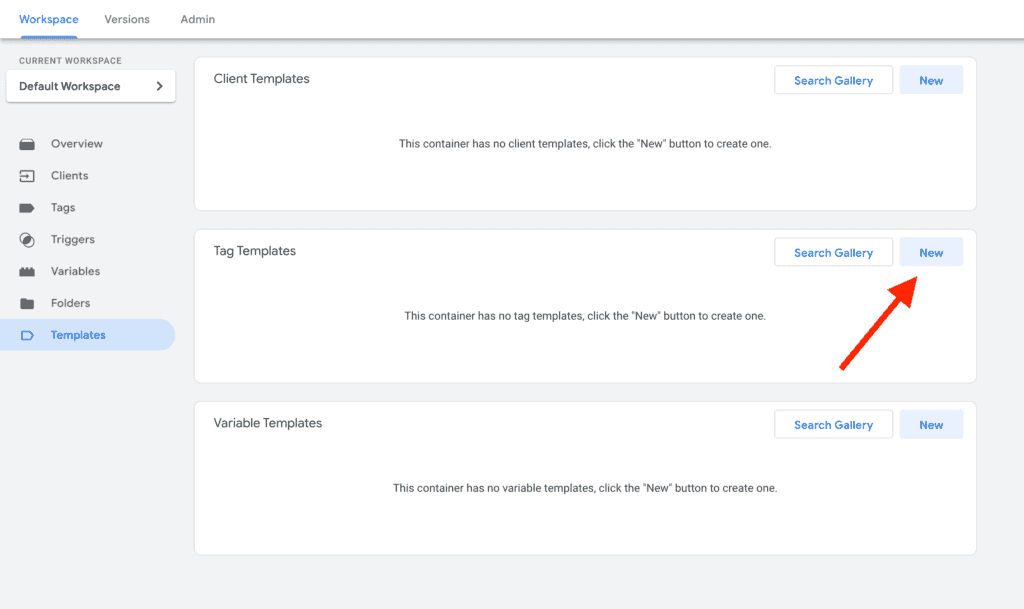
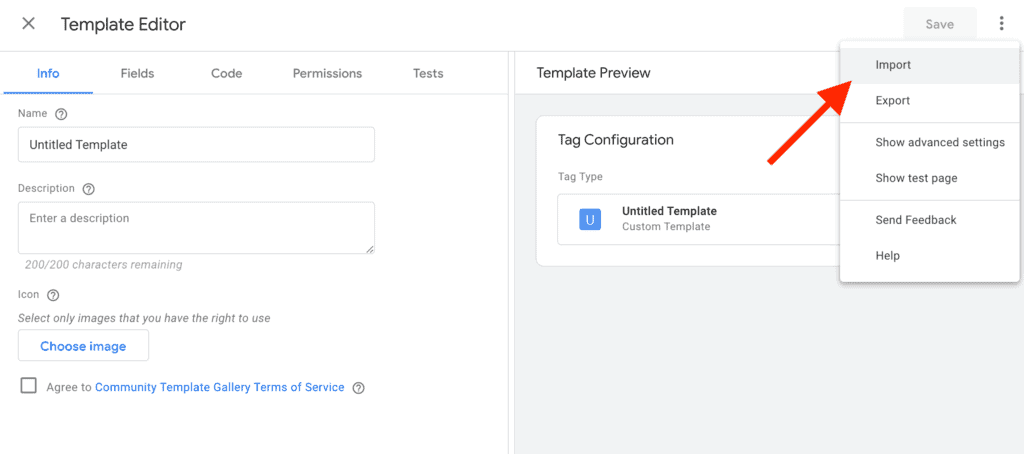
2. Import Facebook server tag template into Google Tag Manager Server Side container. Click on Templates -> Tag Templates -> New. Then on the right upper corner, click on dots, and choose import.
3. Create a trigger that will fire on Universal Analytics or GA4 client.
• For Universal Analytics, choose Client Name = “Universal Analytics”.




Comments